 In this part of the series I will look at using a WCF IParameterInspector implementation to time the actual WCF service operation and send the tracking metrics to Azure Application Insights.
The previous parts of this blog series have discussed adding the necessary NuGet packages to the Visual Studio project, so the Application Insights parts work, how to create a Telemetry Initializer to add information to each Application Insights tracking event, and how to use a WCF IDispatchMessageInspector to get information about each request to the WCF service.
In addition to using a message inspector which intercepts all calls before WCF has determined which operation it should invoke, it is also possible to add an inspector that is called just before and after WCF invokes each operation.
This is done using an implementation of the IParameterInspector interface. It has just two methods:
public object BeforeCall(string operationName, object[] inputs)
{
	var sw = new Stopwatch();
	sw.Start();
	return sw;
}

public void AfterCall(string operationName, object[] outputs, object returnValue, object correlationState)
{
	var sw = (Stopwatch) correlationState;
	// store operation name for message inspector End
	CallContext.LogicalSetData(ItemCorrelationTelemetryInitializer.OPERATION_NAME, operationName);
	telemetryClient.TrackEvent(operationName, null,
		new Dictionary<string, double>() {
			{ $"{operationName} Time (ms)", sw.ElapsedMilliseconds}
		}
	);
}
In my implementation of BeforeCall I simply start a Stopwatch and return it. The IParameterInspector methods work similar to IDispatchMessageInspector in that the return value from the Before-method is passed as a parameter to the After-method.
In AfterCall I retrieve the Stopwatch and call AI’s TelemetryClient.TrackEvent to log how long the operation took too invoke. That way I can track and graph each operation’s duration without the overhead of XML serialization and deserialization. I also store the operation name in CallContext. The operation name is used in my BeforeSendReply method of the IDispatchMessageInspector interface which is described in part two of this blog series.
Now, with the time tracking of the requests, and of each different operation, I can monitor the service’s performance at a glance in the Azure Portal:
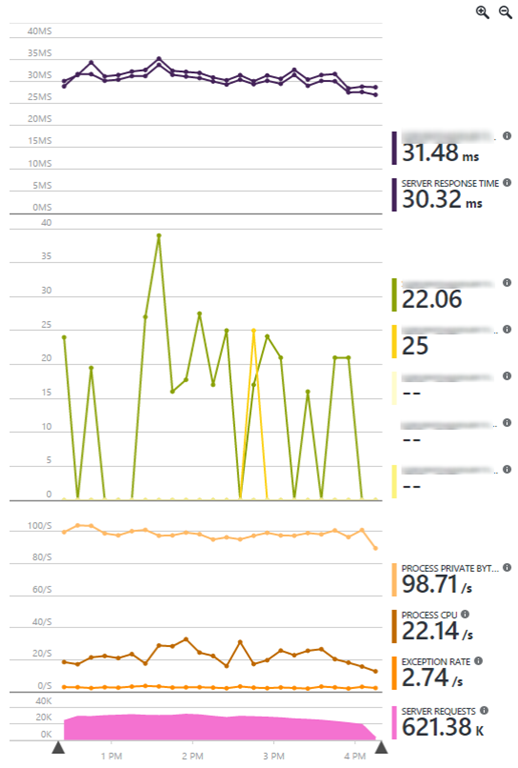
There seems to be a bug in the graph unites, when adding counters of different types to the same graph. I’m quite certain that “Process Private Bytes” is not measured in seconds…
I’m working on getting dependency calls to work properly. With the Azure Application Insights Agent, which can be installed on a server running IIS, it installs itself as a .net profiler to intercept dependency calls. But since this is a Windows Service, that won’t work the same way.
All previous parts of this series:


Leave a Reply